Write a program to implement RPC (Remote Procedure Call)

 Write a program to implement RPC (Remote Procedure Call)

In this example, we make a server (RMIServer.java) to receive input text from client application and replies how many characters it received.


Server Side:
  • Create a remote interface. (myInterface.java)
  • Create a separate java file to implement the remote interface. (RMIServer.java)
  • Register the interface in RMI registry (bind with any name eg: myRMIService)
Client Side:
  • In client code, through interface name (in our case myRMIService) create a "fake remote" object reference of server within client. (RMIClient.java)
  • Through this reference access the server methods / services


Let us have a detailed look on code:

1. MyInterface.java

  1. import java.rmi.*;
  2. public interface MyInterface extends Remote
  3. {
  4.  public String countInput(String input)throws RemoteException;   
  5. }

  • It simply says about a remote service to accept a string input and gives string output.
  • Line no 4  insists that any code implementing this interface should have countInput method.

2. RMIServer.java
  1. import java.rmi.*;
  2. import java.rmi.server.*;
  3. public class RMIServer extends UnicastRemoteObject implements MyInterface
  4. { 
  5.     public RMIServer()throws RemoteException
  6.     { 
  7.         System.out.println("Remote Server is running Now.!!"); 
  8.     }    
  9. public static void main(String arg[])
  10. { 
  11.     try{ 
  12.         RMIServer p=new RMIServer();
  13.         Naming.rebind("rmiInterface",p);
  14.     }  
  15. catch(Exception e)
  16. { System.out.println("Exception occurred : "+e.getMessage()); } 
  17. }

  18.     @Override
  19.     public String countInput(String input) throws RemoteException 
  20.     {
  21.     System.out.println("Received your input "+ input+"  at server!!");
  22.         String reply;
  23.         reply="You have typed "+ input.length() +"  letters!!";
  24.         return reply;
  25.     }
  26. }
  • Line 3 says we are going to implement MyInterface interface
  • Line 13 says we register this service with name rmiInterface. Any client can access the services from this class using this name.
  • Line 19-27 implements the methods offered by interface.
3. RMIClient.java
  1. import java.rmi.*;
  2. import java.io.*; 
  3. public class RMIClient
  4. {   
  5.     public static void  main(String args[])
  6.     { 
  7.         try
  8.       { BufferedReader br=new BufferedReader(new InputStreamReader(System.in)); 
  9.       MyInterface p=( MyInterface)Naming.lookup("rmiInterface");
  10.         System.out.println("Type something..."); 
  11.         String input=br.readLine(); 
  12.         System.out.println(p.countInput(input)); 
  13.             }
  14.         catch(Exception e) { 
  15.             System.out.println("Exception occurred : "+e.getMessage());
  16.         }
  17.     } 
  18.  } 
Line 9:  Looking for the remote service using the name!
Line 12: Accessing the service using the remote object.

RESULT:


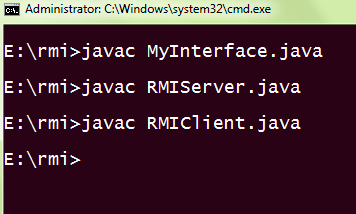
Compile the java files.


Run remote object registry  called  rmiregistry. It is used by RMI servers on the same host to bind remote objects to names.


Run the Server class.

Run the client class. You can see it is prompting for input


Type some text
Input is received by remote server


Client receives reply from remote server

Comments

Popular posts from this blog

The Future of Web Development: Why Next.js is Going Viral

  Are you ready to level up your web development game? Look no further than Next.js, the latest sensation in the world of web development that's taking the industry by storm. With its powerful features, flexibility, and performance optimizations, Next.js is becoming the go-to framework for building modern web applications. In this blog post, we'll explore why Next.js is going viral and how it's changing the landscape of web development. Supercharged Performance: One of the main reasons why Next.js is making waves is its superior performance capabilities. With built-in optimizations like automatic static site generation (SSG) and server-side rendering (SSR), Next.js allows you to create blazing-fast web applications that load quickly and deliver seamless user experiences. This is especially important in today's fast-paced digital world, where users demand instant gratification and have little patience for slow-loading websites. Flexibility and Scalability: Next.js provid...

Importants Links of Leetcode

  Here are all the important discussion posts which contain brief descriptions about a topic with its problem list. Recursion:- A.   https://leetcode.com/tag/recursion/discuss/1733447/Become-Master-In-Recursion Binary Tree and Binary Search Tree:- A.   https://leetcode.com/tag/binary-tree/discuss/1212004/Binary-Trees-study-guide B.   https://leetcode.com/tag/binary-tree/discuss/1820334/Become-Master-in-Tree C.   https://leetcode.com/tag/binary-tree/discuss/1094690/Views-and-Traversal-of-binary-tree-or-Important-topics-or-Must-Read-%3A- ) Dynamic Programming:- A.   https://leetcode.com/discuss/study-guide/458695/Dynamic-Programming-Patterns B.   https://leetcode.com/tag/dynamic-programming/discuss/1437879/Dynamic-Programming-Patterns C.   https://leetcode.com/tag/dynamic-programming/discuss/662866/DP-for-Beginners-Problems-or-Patterns-or-Sample-Solutions D.   https://leetcode.com/tag/dynamic-programming/discuss/1050391/Must-do-Dynamic-programm...

Write a code simulating ARP /RARP protocols

   Write a code simulating ARP /RARP protocols . Aim:        To write a java program for simulating ARP/RARP protocols ALGORITHM: server 1. Create a server socket and bind it to port. 2. Listen for new connection and when a connection arrives, accept it. 3. Send server ‟ s date and time to the client. 4. Read client ‟ s IP address sent by the client. 5. Display the client details. 6. Repeat steps 2-5 until the server is terminated. 7. Close all streams. 8. Close the server socket. 9. Stop. Client 1. Create a client socket and connect it to the server ‟ s port number. 2. Retrieve its own IP address using built-in function. 3. Send its address to the server. 4. Display the date & time sent by the server. 5. Close the input and output streams. 6. Close the client socket. 7. Stop. Program Program for Address Resolutuion Protocol (ARP) using TCP Client: import java.io.*; import java.net.*; impor...